


A wall-mounted television instantly gives your living room or entertainment space a clean and modern appearance. It saves floor space, improves viewing comfort, and helps organize cables for a clutter-free setup. While many homeowners consider mounting a television themselves, the process requires careful planning, the right tools, and proper installation techniques to ensure safety.
If you’re planning a DIY installation or simply want to understand the process before hiring a professional, this guide explains how to install a TV mount correctly. Whether you live in a modern Houston apartment, a suburban home in Sugar Land, or a brick house in The Woodlands, proper installation techniques are essential. If you prefer expert assistance, TV Mounting in Houston professionals can complete the installation safely while ensuring your television is securely mounted and perfectly aligned.
Why Mount Your TV on the Wall?
Wall mounting offers several advantages over placing a television on a traditional stand.
Some of the biggest benefits include:
- Saves valuable floor space
- Creates a modern, clean appearance
- Improves viewing angles
- Keeps children and pets safer
- Reduces clutter by organizing cables
- Enhances your overall entertainment experience
A professionally mounted television also increases stability and minimizes the risk of accidental tipping.
Step 1: Choose the Right Location
The first step is selecting the ideal location for your television.
Consider:
- Comfortable viewing height
- Seating position
- Window glare
- Electrical outlet locations
- Cable routing
- Nearby furniture
Most professionals recommend positioning the center of the screen close to eye level while seated for the most comfortable viewing experience.
Step 2: Locate the Wall Studs
Finding wall studs is one of the most important parts of the installation.
Use a stud finder to identify solid framing behind the drywall. Mark the stud locations using a pencil.
Mounting directly into studs provides the strength needed to safely support your television.
Many Houston homes feature standard drywall with wooden studs, while some newer homes and commercial buildings may have metal studs. Older properties may also include brick or concrete walls that require specialized anchors and mounting hardware. Always verify your wall type before drilling.
Step 3: Measure and Mark the Mounting Position
Using a measuring tape and level, determine exactly where the wall bracket will be installed.
Double-check:
- Height
- Center alignment
- Level positioning
- Distance from furniture
Taking extra time during this step helps prevent unnecessary drilling mistakes.
Step 4: Install the Wall Bracket
Hold the mounting bracket against the wall and align it with the stud markings.
Drill pilot holes before securing the bracket using the supplied lag bolts.
Once installed, use a level again to verify the bracket is perfectly straight.
A securely fastened bracket forms the foundation of a safe TV installation.
Step 5: Attach the Mounting Arms to the TV
Place your television face-down on a soft blanket or padded surface.
Attach the mounting arms to the back of the TV using the manufacturer-provided screws.
Do not overtighten the screws, as this could damage the television.
Make sure both mounting arms are installed evenly.
Step 6: Lift and Secure the Television
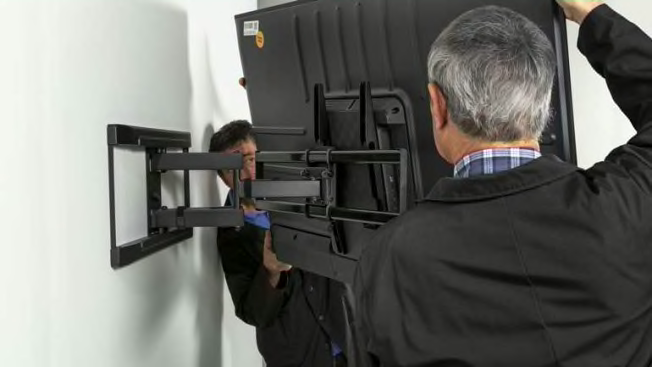
Most televisions larger than 55 inches should be lifted by two people.
Carefully lift the television and hook the mounting arms onto the wall bracket.
Depending on the mount design, tighten the safety screws or locking mechanism to prevent accidental movement.
Gently test the television to ensure it’s securely attached.
Step 7: Organize the Cables
Cable management completes the installation.
You can:
- Use cable covers
- Install in-wall cable management systems
- Bundle cables with cable sleeves
- Use adhesive cable clips
Hidden cables create a cleaner appearance while reducing clutter around your entertainment area.
Related Services
If you’d rather leave the installation to professionals, explore our related services:
- TV Mounting Services
- Wire Concealment
- Fireplace TV Mounting
- Home Theater Installation
DIY vs Professional TV Mounting
| Feature | DIY Installation | Professional Installation |
| Installation Time | 1–3 Hours | 30–90 Minutes |
| Tools Required | Yes | No |
| Proper Leveling | Depends on Experience | Guaranteed |
| Wire Concealment | Optional | Professional Finish |
| Wall Damage Risk | Higher | Minimal |
| Warranty | None | Often Included |
| Best For | Small TVs | Large TVs & Complex Installations |
When Should You Hire a Professional?
While many smaller televisions can be installed by experienced DIY homeowners, professional installation is often the safer option.
Hiring TV Mounting in Houston specialists is recommended if:
- Your wall contains metal studs
- You’re mounting on tile, marble, or natural stone
- You’re installing a full-motion or articulating TV mount
- Your TV is 75 inches or larger
- You need professional wire concealment
- You want a clean home theater setup
- You’re unsure about wall structure or stud locations
Professional installers have the proper equipment, experience, and hardware to complete installations safely while protecting your television and your walls.
Cost of TV Mounting in Houston
The cost of TV Mounting in Houston varies depending on the television size, wall type, and installation complexity.
Typical price ranges include:
- Basic TV mounting: $99–$149
- Full-motion mount installation: $150–$250
- Fireplace TV mounting: $200–$350
- Wire concealment: $75–$200
- Home theater installation: Pricing varies based on equipment and room size.
Requesting a free estimate before scheduling helps you understand the exact cost based on your setup.
Why Choose Us
Homeowners choose our TV Mounting in Houston, TX services because we provide:
- Experienced installers
- Fully insured technicians
- Same-day appointments available
- Professional wire concealment
- Warranty-backed workmanship
- Free estimates
- Fast and reliable service
- Clean installation with minimal disruption
We proudly serve Houston, Katy, Sugar Land, Cypress, Pearland, The Woodlands, and surrounding areas.
Final Thoughts
Installing a television wall mount requires careful measurements, proper tools, and attention to detail. While many homeowners successfully complete smaller installations themselves, larger televisions and more complex mounting situations are often best handled by professionals.
Whether you’re upgrading your living room, mounting a television above a fireplace, or creating a complete home theater, our TV Mounting in Houston professionals are ready to help. We proudly serve Houston, Katy, Sugar Land, Cypress, Pearland, The Woodlands, and surrounding areas with safe, reliable, and professional TV installation services. Contact us today for a free estimate and enjoy perfectly mounted entertainment with same-day service available.
Frequently Asked Questions
1. Can I install a TV wall mount by myself?
Yes, smaller televisions can often be mounted by experienced DIY homeowners. However, larger TVs or complex wall types are generally safer to install with professional assistance.
2. What is the best height for mounting a TV?
For the most comfortable viewing experience, the center of the television should generally be positioned close to eye level when you’re seated.
3. Can a TV be mounted above a fireplace?
Yes. Professional installers can safely mount televisions above fireplaces using appropriate mounting systems and hardware while considering heat exposure and viewing angles.
4. Do professional installers hide TV cables?
Yes. Many TV Mounting Houston Tx companies offer in-wall cable concealment or decorative cable management solutions for a clean appearance.
5. Why should I hire a professional TV mounting service?
Professional installation ensures your television is securely mounted, perfectly level, safely attached to the wall structure, and installed with proper cable management, reducing the risk of damage to both your TV and your home.
